A URL shortener is a deceptively simple service: take a long URL, return a short one, and redirect the short one back to the original. At a surface level it looks like a two-row database with a lookup. But the design challenge compounds quickly at scale: you must generate short IDs that are guaranteed unique across a distributed fleet without a global lock, keep redirect latency near zero for every link click everywhere in the world, handle a read:write ratio of 100:1 without a read bottleneck, support custom aliases without collision with the auto-generated namespace, purge expired links without impacting hot-path performance, and record click analytics while keeping the redirect path as fast as a CDN edge response. Each of these is a non-trivial system design decision, and their interactions create subtle correctness and performance traps.
- 6-char base-62 slug — 62⁶ > 56 billion unique slugs; sufficient for years of URL volume at this scale.
- ID generation beats hashing — Snowflake or range assignment avoids collisions at the source; MD5/SHA-1 prefix collisions require detection + retry loops.
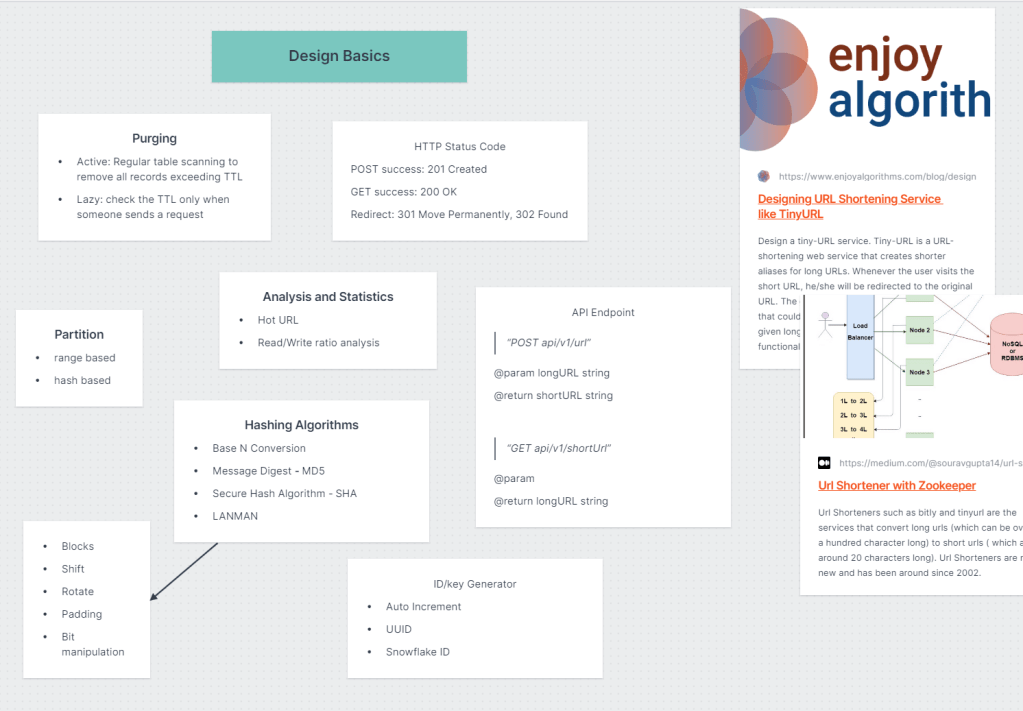
- Bloom filter for collision check — Redis Bloom filter: negative = definitely new (safe to write); positive = maybe exists (fall back to DB lookup). Keeps the fast path cheap.
- Redis caching on reads — absorbs the 100:1 read-to-write ratio; most redirects never hit the database.
- 301 vs. 302 is a product decision — 301 caches in browser (fewer hits, no analytics); 302 hits shortener every time (full analytics, higher load).
- Custom aliases need a separate namespace — user-supplied slugs must be checked against both the auto-generated namespace and the custom alias table to prevent collisions.
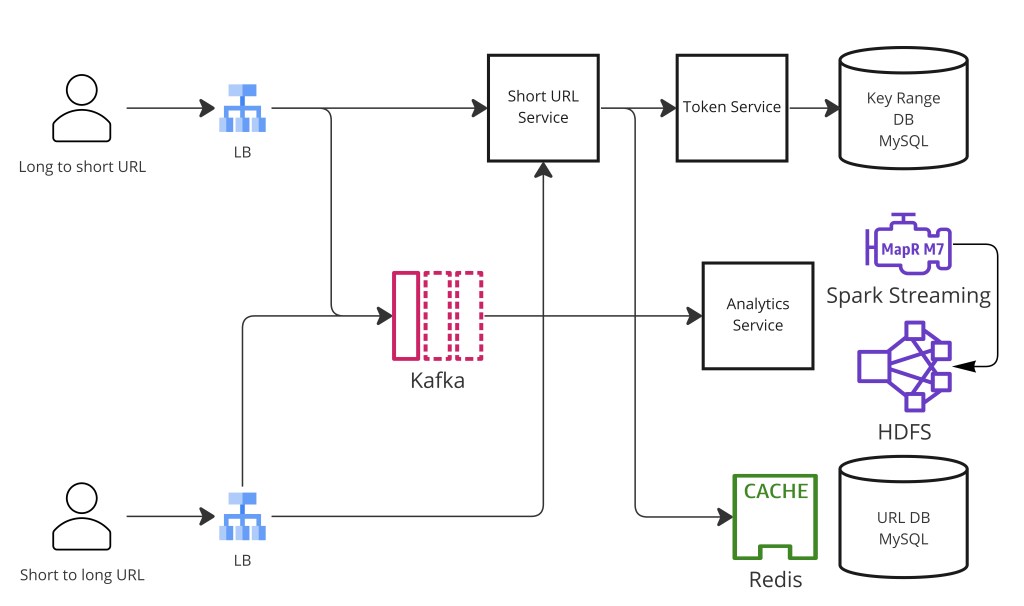
- Click analytics via async pipeline — log click events to Kafka on every redirect; analytics consumers aggregate asynchronously without adding latency to the hot redirect path.
6-character base-62 slugs give sufficient namespace for a year's worth of URLs. Use ID generation (Snowflake or range assignment) over hashing to avoid collisions. Add a Redis Bloom filter to check for existing slugs before writing. Cache hot redirects in Redis. Purge expired URLs via TTL, scheduled scans, or lazy evaluation. Rate-limit write endpoints to prevent DDoS. Stream click events to Kafka for async analytics.
Step 1 — Clarify Requirements
Before designing anything, scope the problem explicitly. URL shortener is a common interview prompt because it seems trivial but reveals depth quickly. Ask the interviewer about these dimensions:
Functional requirements
- Generate a short URL from a long URL input.
- Redirect a short URL back to the original long URL.
- Support custom aliases (user-supplied short codes like
tiny.url/my-brand). - Set an expiration date/TTL on links; expired links return 404.
- Track click analytics: total clicks, unique visitors, referrer, country, device type.
- User accounts for managing their own links (optional, but common in product interview variants).
Non-functional requirements
- Very low redirect latency — redirects happen on every link click across the internet; target <50 ms p99 globally.
- Very high availability — a down service breaks every shortened link in existence; target 99.99%.
- Uniqueness guarantee — two different long URLs must never map to the same short code; one short code must always resolve to exactly one long URL.
- Scalability — handles 10M DAU with a 10:1 read-to-write ratio; scales to 100:1 at large scale.
Explicitly ask whether click analytics are required — the answer drives your redirect strategy. If yes, you likely want 302 redirects (no browser caching) and an analytics pipeline. If no, 301 + aggressive CDN caching is simpler and cheaper. State your choice and the reasoning.
Step 2 — Capacity Estimation
Back-of-the-envelope sizing anchors storage and infrastructure decisions. Assume a mid-size deployment with 10M DAU.
Traffic
- Write rate: assume each DAU creates ~0.1 short URLs per day → 10M × 0.1 = 1M writes/day ≈ 12 writes/sec average; peak ~2–3× → ~30 writes/sec.
- Read rate: assume each URL is clicked ~10 times/day on average → 1M × 10 = 10M redirects/day ≈ 115 reads/sec average; peak 5–10× → ~1,000 reads/sec.
- Read:write ratio ≈ 10:1 at this scale; at large viral link scale (a popular link being clicked millions of times) it easily hits 100:1 or higher.
Storage
- Each URL record: ~100 bytes (slug 6 B, long URL ~100 B avg, created_at 8 B, expires_at 8 B, user_id 8 B) ≈ ~130 bytes/record.
- 1M new URLs/day × 365 days × 130 bytes ≈ ~47 GB/year for URL records — trivially fits in a single SQL database, let alone a sharded one.
- Analytics events: if we log every click (115 reads/sec × 86,400 s × ~200 bytes) ≈ ~2 GB/day of click events; these go to a time-series store or data warehouse, not the hot URL database.
Slug namespace sizing
- Base-62 character set:
[0-9, a-z, A-Z]= 62 characters. - 6-character slug: 62⁶ = 56,800,235,584 unique codes — over 56 billion.
- At 1M new URLs/day, this namespace lasts over 155,000 years. Even at 1B URLs/day it lasts ~56 years. 6 characters is the canonical answer.
- 7 characters gives 62⁷ = 3.5 trillion — use if you genuinely expect billion-per-day scale.
The storage math shows why URL shortener is an often-misunderstood "hard" problem: the data volume is tiny. The real challenges are uniqueness guarantees at distributed write scale, redirect latency at read scale, and correctness of the custom alias namespace — not raw storage.
Step 3 — API Design
Clean, minimal REST surface. The entire service is essentially two endpoints plus a management layer:
# Write: create a short URL
POST /api/shorten
     Authorization: Bearer <token>
     { "long_url": "https://example.com/very/long/path?q=1",
       "custom_alias": "my-brand",   // optional
       "expires_at": "2025-12-31" }  // optional
     → 201 { "short_url": "https://tiny.url/aB3kPq",
             "slug": "aB3kPq", "expires_at": "2025-12-31" }

# Read: redirect
GET /{slug}
     → 302 Location: https://example.com/very/long/path?q=1
     → 404 if slug not found or expired

# Analytics: click stats for a link
GET /api/links/{slug}/analytics
     Authorization: Bearer <token>  // must own the link
     → { "total_clicks": 14827, "unique_visitors": 9301,
         "clicks_by_country": {...}, "clicks_by_day": [...] }

# Management: delete a link
DELETE /api/links/{slug}
       Authorization: Bearer <token>
The POST /api/shorten endpoint is idempotent for the same (long_url, custom_alias) pair — submitting the same request twice returns the existing slug rather than creating a duplicate. Rate-limit this endpoint per user token: free tier might allow 10 creates/min, paid tier 100/min. The GET /{slug} redirect endpoint is on the hot path; it must be as fast as possible and is never rate-limited for readers (only the write side needs protection).
Step 4 — Short ID Generation: Hashing vs. ID Generation
The core question is how to generate the 6-character slug. There are four main approaches, each with distinct tradeoffs:
| Approach | Mechanism | Collision Risk | Sortable |
|---|---|---|---|
| MD5 / SHA-1 hash | Hash the long URL, take first 6 chars of base-62 encoding | High — birthday paradox bites at 56B space with short prefix | No |
| UUID (random) | Generate random 128-bit UUID, encode first 6 chars in base-62 | Low but nonzero — requires collision detection | No |
| Snowflake ID | 41-bit timestamp + 10-bit machine ID + 12-bit sequence; encode in base-62 | Zero if machine IDs unique | Yes (time-ordered) |
| Range assignment | Central controller assigns numeric ranges to worker nodes; workers use next value in range | Zero | Yes |
Why hashing is problematic
Hashing the long URL and taking the first 6 characters seems elegant — same URL always produces the same slug (deterministic), no coordination needed. The problem is the birthday paradox: in a 56-billion-slot space, after inserting roughly √(2 × 56B) ≈ 334,000 URLs, the probability of a collision exceeds 50%. At 1M URLs/day, you hit this in under a day. Every collision requires detection (DB lookup or Bloom filter check) and a retry with a salt — now you have a retry loop on the write path with indeterminate latency.
Snowflake ID generation
Twitter's Snowflake format generates 64-bit IDs from three components packed into a single integer: a 41-bit millisecond timestamp (giving ~69 years of headroom from epoch), a 10-bit machine ID (supporting 1,024 unique generator nodes), and a 12-bit sequence counter (allowing 4,096 IDs per millisecond per machine). Converting this 64-bit integer to base-62 gives at most 11 characters — for a 6-char slug, take the lower 36 bits (base-62 encoding of numbers up to 62⁶ ≈ 56B requires ~36 bits).
import time

EPOCH = 1700000000000  # custom epoch ms
MACHINE_ID = 1          # assigned at deploy time (0–1023)
BASE62 = "0123456789abcdefghijklmnopqrstuvwxyzABCDEFGHIJKLMNOPQRSTUVWXYZ"
_seq = 0

def generate_snowflake():
    global _seq
    ts = int(time.time() * 1000) - EPOCH
    _seq = (_seq + 1) & 0xFFF   # 12-bit rollover
    return (ts << 22) | (MACHINE_ID << 12) | _seq

def to_base62(n: int, length=6) -> str:
    chars = []
    while n > 0:
        chars.append(BASE62[n % 62])
        n //= 62
    return "".join(reversed(chars)).zfill(length)[-length:]

def new_slug() -> str:
    return to_base62(generate_snowflake())
Range assignment (counter-based)
An alternative to Snowflake: a central coordinator (e.g., a ZooKeeper node or a dedicated counter service backed by a SQL AUTO_INCREMENT) assigns numeric ranges to worker nodes. Worker 1 gets 0–999,999; worker 2 gets 1,000,000–1,999,999, etc. Each worker converts its next counter value to base-62 and uses it as the slug. No coordination is needed within a range — the worker increments a local counter. When a range is exhausted, the worker requests a new range from the coordinator. This approach is simpler than Snowflake and collision-free but creates a single-point coordinator that must be highly available.
For most interview scenarios, Snowflake is the preferred answer: it is coordination-free at the ID generation level (each node generates IDs independently given a pre-assigned machine ID), time-ordered (useful for debugging and analytics), and collision-free by construction. Range assignment is a valid alternative — prefer it if the interviewer asks about simpler setups.
Step 5 — Bloom Filter for Collision Detection
Even with collision-free ID generation, you still need collision detection for the hash-based approach and for custom aliases (which are user-supplied strings that could collide with auto-generated slugs or with each other). The canonical tool is a Redis Bloom filter.
A Bloom filter is a probabilistic data structure that answers "is this element definitely not in the set?" or "is this element possibly in the set?". It never produces false negatives but may produce false positives. The operational rule:
- Bloom filter says NO (bit not set) → slug is definitely new — safe to write, no DB lookup needed.
- Bloom filter says YES (bit set) → slug might exist — fall back to a DB lookup to confirm. If the DB says it exists, retry with a new slug or salt.
This keeps the write fast path — the overwhelmingly common case (new slug) — an O(1) in-memory Redis check rather than a DB round-trip. The false-positive rate (controlled by the filter's bit array size and hash count) is typically configured to 1% or lower, meaning only 1 in 100 writes incurs an unnecessary DB lookup.
A single Redis Bloom filter becomes a bottleneck at high scale. Distributing Bloom filter checks across multiple Redis instances reduces the bottleneck but sacrifices a single source of truth — a known tradeoff without a clean solution at extreme scale. An alternative is to skip the Bloom filter entirely and use Snowflake IDs (which are collision-free by construction), checking only custom aliases in the DB.
Step 6 — Data Model
The URL store is simple but the schema details matter for correctness and query performance:
CREATE TABLE urls (
  slug          VARCHAR(8)  PRIMARY KEY,    -- short code (6–8 chars)
  long_url      TEXT        NOT NULL,
  user_id       BIGINT,                     -- NULL if anonymous
  is_custom     BOOLEAN     DEFAULT FALSE, -- user-supplied alias
  created_at    TIMESTAMP   NOT NULL,
  expires_at    TIMESTAMP,                  -- NULL = never expires
  click_count   BIGINT      DEFAULT 0      -- approximate, incremented async
);

CREATE INDEX idx_user_id ON urls(user_id);   -- list user's links
CREATE INDEX idx_expires ON urls(expires_at) -- purge expired rows
  WHERE expires_at IS NOT NULL;

-- Analytics events (high-volume, written to Kafka → OLAP store)
-- NOT stored in the hot SQL DB
-- Schema of Kafka message:
-- { slug, timestamp_ms, ip, user_agent, referrer, country, device_type }
Key schema decisions: the slug is the primary key — every redirect is a primary-key lookup, which is O(log n) on a B-tree index and extremely fast. The expires_at partial index (filtered to non-NULL rows) keeps the purge scan cheap. The click_count column is an approximate counter — it is incremented asynchronously by the analytics consumer, not on the redirect hot path, so it may lag by minutes but never blocks a redirect.
Step 7 — Core Architecture and Read/Write Paths
-- Write path (shorten a URL)
POST /api/shorten { long_url, custom_alias?, expires_at? }
  → Rate limiter (token bucket per user_id or IP)
  → If custom_alias provided:
      check alias not already taken (DB lookup)
      slug = custom_alias
    Else:
      slug = to_base62(snowflake_id())
  → Check Redis Bloom filter (for hash approach only)
      negative → safe to write
      positive  → DB lookup to confirm; retry on collision
  → Write { slug, long_url, user_id, expires_at } to primary DB
  → Add slug to Bloom filter (if using)
  → Add slug → long_url to Redis cache (TTL = min(expires_at, 24h))
  → Return { short_url: "https://tiny.url/{slug}" }

-- Read path (redirect)
GET /{slug}
  → Check Redis cache
      hit  → check expires_at → 302/404 redirect
      miss → DB lookup by PRIMARY KEY
               found  → cache → 302 redirect
               not found → 404
  → Fire-and-forget: publish click event to Kafka
      { slug, ts, ip, user_agent, referrer, country }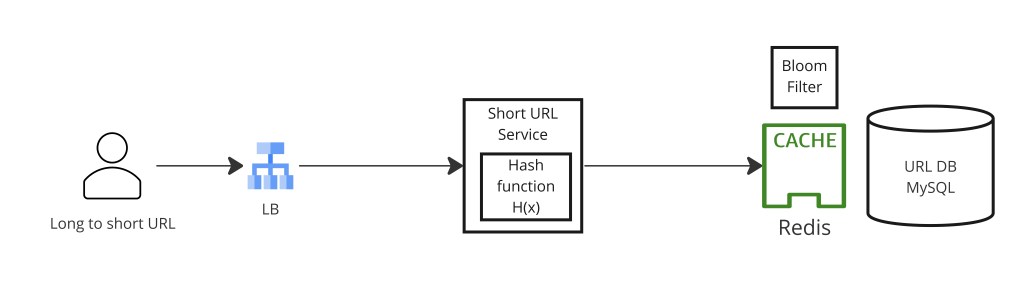
Redis caching in depth
With a 100:1 read-to-write ratio, caching is the single highest-leverage optimization. The cache pattern is look-aside with write-through: on a write, populate the cache immediately so the first redirect is already a cache hit; on a read miss, pull from the DB and populate. Key caching decisions:
- TTL — set to
min(link expires_at, 24 hours). A link expiring tomorrow should not be cached past its expiry. A non-expiring link gets 24 h TTL with eager refresh to avoid stampede on popular links. - Hot links — a viral link shared by a celebrity can receive millions of clicks in minutes, saturating one Redis shard. Mitigate with local in-process cache (LRU cache in the redirect service, 1 s TTL) in front of Redis, or by replicating hot keys across multiple Redis nodes.
- Cache stampede — when a popular link's cache entry expires, thousands of redirect requests simultaneously miss and hammer the DB. Use a single-flight mutex: only one request rebuilds the cache entry; others wait for it. Or use probabilistic early expiry (refresh before the TTL hits zero based on the link's click velocity).
- Cache invalidation — when a link is deleted (via
DELETE /api/links/{slug}), immediately evict it from cache. Never serve a deleted link from stale cache.
Step 8 — Redirect: 301 vs. 302
The HTTP redirect response code is a product decision with significant system-design implications:
| Code | Meaning | Browser behavior | Analytics impact | Server load |
|---|---|---|---|---|
| 301 | Permanent Redirect | Caches in browser; subsequent clicks skip the shortener | Only first click is recorded | Very low — browser handles repeat visits |
| 302 | Temporary Redirect | Does not cache; every click hits the shortener | Every click is recorded | Higher — all clicks go through service |
If click analytics are a product requirement, you must use 302 — a 301 means the shortener never sees repeat clicks from the same browser after the first. If analytics are not required and you want maximum performance at minimum cost, 301 + CDN caching is the right choice: CDN edge nodes cache the 301 and serve repeat redirects at edge latency without touching your origin servers.
Some services use 302 for the first N clicks to gather analytics, then switch to 301 after a threshold. This is complex to implement correctly (the switch must be coordinated with cache invalidation) but is occasionally asked about in advanced interviews. Simpler: use 302 always but add a CDN layer that caches the redirect for a short TTL (e.g., 60 s) to reduce origin load while still capturing most clicks.
Step 9 — Custom Aliases
Custom aliases (tiny.url/my-brand) are user-supplied strings that must not collide with either auto-generated slugs or with other users' custom aliases. The namespace management rules:
- Validation — enforce a character allow-list (a-z, A-Z, 0-9, hyphen, underscore), minimum length (3 chars), maximum length (50 chars). Reject reserved words (
api,admin,health, etc.). - Uniqueness check — before accepting a custom alias, check the
urlstable:SELECT 1 FROM urls WHERE slug = :alias. If it exists and is owned by another user, reject with 409 Conflict. If it exists and is owned by the same user (idempotent re-submit), return the existing record. - Namespace isolation — store both custom aliases and auto-generated slugs in the same
urlstable, differentiated by theis_customflag. The primary key check prevents collisions between the two namespaces automatically. - Custom alias limits — free accounts might allow 5 custom aliases; paid accounts unlimited. Enforced at the API layer, not the DB.
Step 10 — Click Analytics Pipeline
Click analytics must not add latency to the redirect hot path. The solution is a fire-and-forget async pipeline:
- On every redirect, the redirect service publishes a click event to Kafka asynchronously (non-blocking). The redirect itself returns immediately.
- Kafka consumers (analytics workers) consume the event stream and write to a time-series store (ClickHouse, BigQuery, or Redshift) optimized for aggregation queries.
- A separate aggregation job (Spark batch or Flink streaming) pre-computes per-link rollups: total clicks, unique IPs, clicks by country/device/referrer, clicks by hour/day.
- The analytics API (
GET /api/links/{slug}/analytics) reads from the pre-computed rollup store, not from raw events — O(1) lookup rather than a full scan of billions of click records.
Redirect service
  └── fire-and-forget → Kafka topic: "click-events"
        { "slug": "aB3kPq", "ts": 1716556800000, "ip": "1.2.3.4",
          "country": "US", "device": "mobile", "referrer": "twitter.com" }

Analytics consumer (Flink streaming)
  └── reads Kafka → counts per (slug, hour, country, device)
  └── writes rollups to ClickHouse:
        -- clicks_hourly(slug, hour, country, device, click_count)

Analytics API
  └── SELECT SUM(click_count) FROM clicks_hourly WHERE slug = 'aB3kPq'
      → returns in <10 ms (indexed rollup table)
Step 11 — URL Expiration and Purging
Expired URLs must be cleaned up to reclaim storage and return correct 404 responses. Three strategies, each with different tradeoffs:
| Strategy | How it works | Pros | Cons |
|---|---|---|---|
| Redis TTL | Set TTL on the cache entry equal to the link's expiry; cache evicts automatically | Zero DB overhead; works for cache hits | Expired rows accumulate in DB; DB still shows record as existing |
| Lazy evaluation | On every redirect, check expires_at < NOW(); return 404 and optionally delete the DB row | No batch job needed; self-cleaning | Expired rows accumulate until accessed; delete on the hot path adds latency |
| Scheduled scan | Airflow job runs nightly: DELETE FROM urls WHERE expires_at < NOW() using the partial index | DB stays clean; predictable load | Expired links are "valid" for up to 24 h in DB; batch delete can be slow on large tables |
The recommended approach combines all three: Redis TTL handles the cache layer correctly for most traffic; lazy expiry check in the redirect handler catches DB hits on expired-but-cached-elsewhere links; nightly scan keeps the DB table clean and the partial index small. The lazy delete should be done asynchronously (e.g., enqueue to a deletion queue) to keep the redirect response fast.
Step 12 — Scaling and Fault Tolerance
At high scale, the URL shortener must remain available and fast despite hardware failures, traffic spikes, and regional outages.
Read scaling
The redirect service is stateless — it reads from Redis and occasionally from the DB. Scale horizontally behind a load balancer. With a hot Redis cache absorbing 95%+ of reads, the DB is under minimal load. Add read replicas for the DB to handle the remaining cache misses. Deploy the redirect service in multiple regions with a CDN or GeoDNS routing users to their nearest instance.
Write scaling
At ~30 writes/sec, a single SQL primary easily handles URL creation. If write scale becomes a concern (say, 10,000 writes/sec for a platform that also offers programmatic link creation via API), shard the DB by slug prefix: slugs starting with 0-9 go to shard A, a-m to shard B, n-z to shard C. Since each redirect is a primary-key lookup on the slug, routing to the correct shard is a simple character map — no cross-shard joins needed.
Multi-region consistency
A globally distributed URL shortener must handle the case where a link created in US-East is immediately clicked by a user in Asia-Pacific. Options:
- Global single-region primary + regional read replicas — writes go to US-East; replicas in EU and APAC catch up within seconds. Redirect reads hit the local replica. A newly created link may take 1–2 s to appear in APAC — usually acceptable.
- Multi-primary with conflict detection — each region accepts writes with a Snowflake ID (machine ID encodes region). Since Snowflake IDs are globally unique by construction, no conflicts are possible. Replication propagates records across regions asynchronously.
Fault tolerance
- Redis failure — if the cache cluster is down, all redirects fall through to the DB. Design the DB capacity to handle 100% of redirect traffic for the duration of a Redis outage (minutes to hours with automatic recovery). Redis Cluster with replica shards reduces the blast radius.
- DB failure — automatic failover to a replica (e.g., via Amazon RDS Multi-AZ or Patroni for PostgreSQL). Brief window of read-only mode during failover is acceptable; link creation queued and retried.
- Kafka failure — click events are lost for the duration. Analytics accuracy degrades but redirects are unaffected (fire-and-forget means the redirect does not wait for Kafka). Kafka itself runs with replication factor ≥ 3.
Step 13 — Rate Limiting and Security
The write endpoint must be protected with a rate limiter to prevent DDoS attacks that generate millions of slugs, exhausting both storage and the slug namespace. Security layers:
- Per-user token bucket — authenticated users get a rate limit (e.g., 10 creates/min free tier, 100/min paid). Implemented in Redis with a sliding window counter:
INCR rate:user:{user_id}:{minute}+EXPIRE. - Per-IP rate limit — unauthenticated requests (anonymous shortening) are limited by IP to prevent unauthenticated abuse. More permissive than per-user but necessary as a backstop.
- URL validation and malware scanning — validate that the long URL is a valid URL (regex + DNS resolution check). Integrate with a malware/phishing URL database (Google Safe Browsing API) to reject known malicious links before creating a slug that would then propagate the phishing link.
- Spam link detection — rate-limit the same long URL from the same user (creating 1,000 slugs all pointing to the same phishing page is a common abuse pattern).
- The read endpoint is not rate-limited for anonymous users — redirects are cheap and caching absorbs most load. Rate-limit only if a specific IP is making an obviously automated volume of redirect calls (bot detection layer).
Step 14 — Key Tradeoffs
| Decision | Choice | Trade-off accepted |
|---|---|---|
| Slug generation | Snowflake (ID-based) | Requires pre-assigned machine IDs; slight time-ordering reveals creation volume |
| Redirect code | 302 (temporary) | Higher server load vs. 301; required if click analytics are a product feature |
| Collision detection | Bloom filter in Redis | False positives require DB fallback; filter itself needs to be distributed at extreme scale |
| Analytics pipeline | Async (Kafka → OLAP) | Clicks are counted with a brief lag; redirect latency is not impacted |
| Expiry enforcement | Lazy + nightly scan | Expired links accessible for up to the cache TTL after expiry (seconds); DB cleaned within 24 h |
| Storage | SQL (single table) | Trivially fits the data volume; no need for the complexity of distributed NoSQL |
URL shortener design is a study in making boring things scale: Snowflake ID generation beats hashing (avoid collisions at the source), Bloom filters make collision checks cheap on the write path, Redis caching absorbs the 100:1 read amplification, and slug length arithmetic confirms 6 characters is sufficient for decades. The subtle choices — 301 vs. 302, which purge strategy, whether to use a Bloom filter at all with Snowflake IDs — are driven by product requirements, not technical constraints. Know the tradeoffs, state your assumptions, and justify each choice.
Why prefer ID generation over hashing for slug generation? Hash functions (MD5, SHA-1) can produce the same 6-character prefix for different URLs due to the birthday paradox — collision detection and retry add complexity and indeterminate latency. Snowflake or range-based ID generation eliminates collisions at the source.
How does the Bloom filter speed up collision detection? A Bloom filter negative (bit not set) guarantees the slug is new — no DB lookup needed. Only positives (rare) require a DB fallback. This keeps the write fast path O(1) in memory.
301 or 302 redirect? 301 (permanent) is browser-cached — lower server load but click analytics are lost after the first visit. 302 (temporary) hits the shortener on every click — full analytics at higher cost. Choose based on whether analytics are a product requirement.
How do you handle a viral link that gets 10M clicks in one hour? Hot key in Redis — cache it across multiple shards or add an in-process LRU cache in each redirect service instance (1–5 s TTL) to absorb the spike before it hits Redis.
How do you prevent the analytics pipeline from slowing down redirects? Fire-and-forget publish to Kafka — the redirect returns the 302 immediately and does not wait for the Kafka write to confirm. Loss of a few click events during a Kafka outage is acceptable; redirect availability is not.