OAuth 2.0 is an authorization framework that allows third-party applications to obtain limited access to a user's resources on a web service, without needing to know the user's login credentials. Before OAuth, the only way to give a third-party app access to your data was to hand over your username and password — a serious security risk. OAuth solves this by introducing a delegated-access model built around scoped, expiring tokens. Published as RFC 6749 in 2012, it has since become the de facto authorization standard across the web, underpinning "Login with Google," API authorization, microservice-to-microservice auth, and device authorization flows for TVs and IoT devices alike. Understanding the full protocol — all four grant types, PKCE, token lifecycle, scopes, and the boundary with OpenID Connect — is essential for any engineer building or securing modern APIs.
- OAuth 2.0 is authorization, not authentication — it says what you can do, not who you are. Add OpenID Connect (OIDC) on top for identity (the ID token).
- Authorization Code + PKCE is the secure default for all user-facing flows (web and mobile); the authorization code is exchanged server-side, keeping tokens out of the browser.
- Client Credentials for machine-to-machine — no user involved; service authenticates as itself with client_id + client_secret.
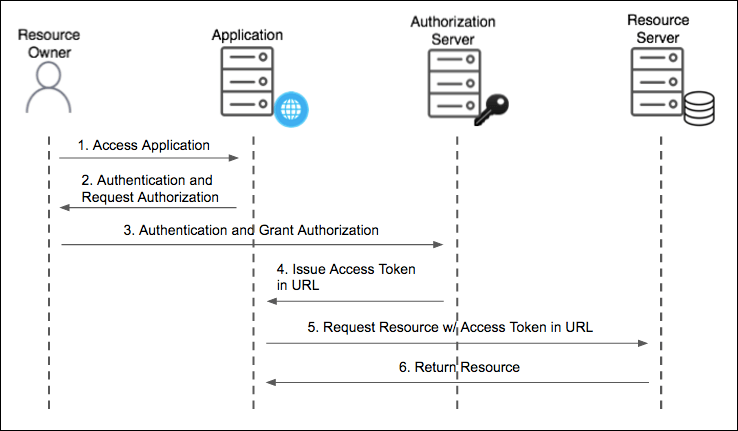
- Implicit grant is deprecated — it returns tokens in the URL fragment, exposing them to browser history and JavaScript. Use Authorization Code + PKCE instead.
- Access tokens should be short-lived (minutes to an hour); refresh tokens must be stored server-side and rotated on each use.
- Always validate the state parameter in the Authorization Code flow to prevent CSRF attacks.
OAuth 2.0 is authorization (what you can do), not authentication (who you are). It introduces an authorization layer: instead of sharing credentials, the resource owner grants a client a scoped, expiring access token issued by the authorization server. Authorization Code flow is the secure default for server-side apps; Client Credentials is used for machine-to-machine.
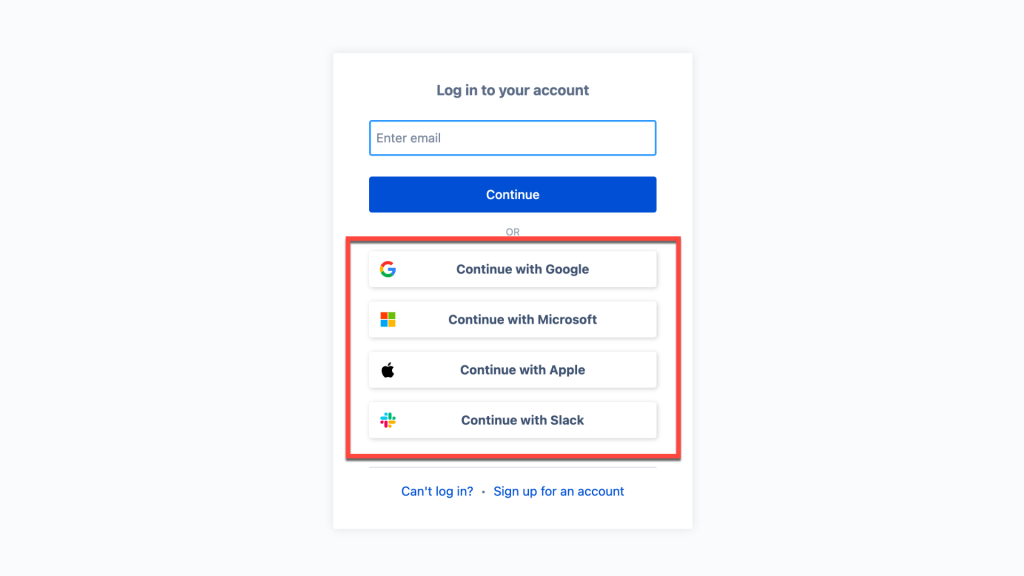
Key Roles
| Role | Responsibility |
|---|---|
| Resource Owner | The end-user who owns the protected resource and grants permission for a client to access it on their behalf. |
| Client | The application requesting access (web app, mobile app, CLI tool, backend service). Can be "confidential" (can keep a secret) or "public" (cannot, e.g. SPA/mobile). |
| Authorization Server | Authenticates the resource owner, obtains consent, and issues access tokens and refresh tokens. Often separate from the resource server (e.g., Google's auth server vs. the Calendar API). |
| Resource Server | Hosts the protected resources (e.g., a REST API). Validates access tokens on every request before serving data — by introspecting them or verifying their JWT signature. |
| Access Token | A short-lived credential representing the granted authorization. Contains scope and expiration. Can be opaque strings (require introspection) or self-contained JWTs (verified locally). |
| Refresh Token | A long-lived credential used to obtain new access tokens without user re-authentication. Must be stored securely server-side and rotated on each use. |
OAuth 2.0 vs. Authentication — The Critical Distinction
A common interview mistake: confusing OAuth with authentication. OAuth 2.0 is purely about authorization — granting a client permission to perform actions on behalf of a user. It does not tell you who the user is. An access token says "this client is allowed to read your calendar," not "this is Alice." OpenID Connect (OIDC) is the authentication layer built on top of OAuth 2.0 — it adds an ID token (a JWT) that carries identity claims like sub (subject identifier), name, email, and email_verified. When you click "Login with Google," you are using OIDC (identity) over OAuth (authorization). The Google API server is both the OAuth authorization server and the OIDC identity provider.
| Question | OAuth 2.0 | OpenID Connect |
|---|---|---|
| What problem does it solve? | Authorization — can this app access your data? | Authentication — who is this user? |
| What does it issue? | Access token (+ optional refresh token) | ID token (JWT with identity claims) + access token |
| Scope used? | Resource-level scopes (read:calendar, write:orders) | openid scope required; profile, email optional |
| Token validates? | What the client is allowed to do | Who the user is (sub, name, email, etc.) |
| Spec | RFC 6749 | OIDC Core 1.0 (built on OAuth 2.0) |
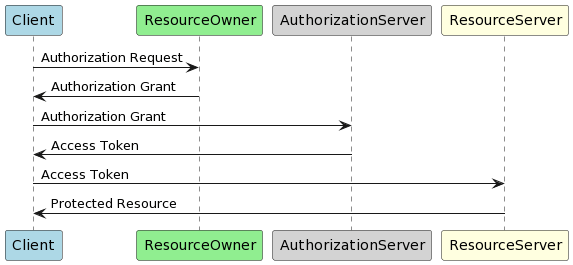
Authorization Grant Types — All Four in Depth
A "grant" is the method by which a client obtains authorization. OAuth 2.0 defines four grants for different client types and use cases. Picking the wrong one is a security vulnerability, not just a design smell.
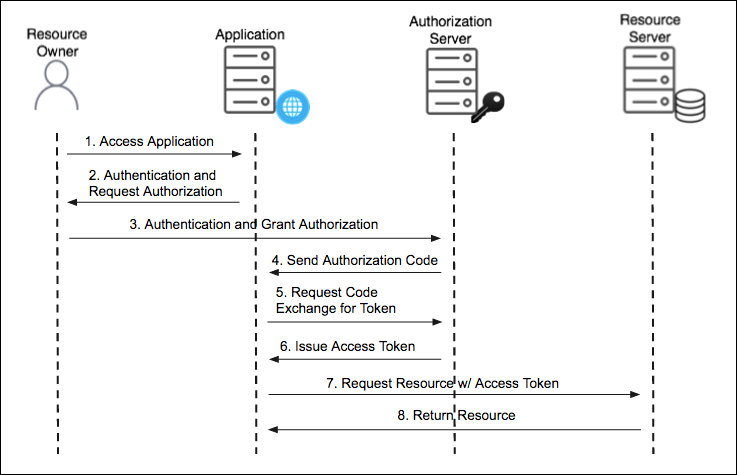
1. Authorization Code — The Secure Default for User-Facing Flows
The most secure flow for any client that involves a human user. The key insight: a short-lived, single-use authorization code is returned via the browser redirect, then immediately exchanged server-to-server for the actual tokens. The tokens never touch the browser URL bar, browser history, or the JavaScript environment. The client's backend does the code exchange using its secret — the code alone is useless to an attacker who intercepts the redirect.
- User clicks "Login with X" — client redirects user to the authorization server with
response_type=code,scope,redirect_uri, and astateparameter (CSRF protection — a random nonce). - User authenticates and consents on the authorization server's UI — user never enters credentials on the client's site.
- Authorization server redirects back to the client's
redirect_uriwith a short-livedcodeand the originalstatevalue. - Client verifies
statematches what it sent (CSRF check), then the client's backend exchanges the code for tokens via a POST to the token endpoint — withclient_secret. - Authorization server returns
access_token, expiry, and optionallyrefresh_token.
# Step 1 — redirect user to auth server
GET https://auth.example.com/authorize
  ?response_type=code
  &client_id=my-app
  &redirect_uri=https://myapp.com/callback
  &scope=read:profile email
  &state=xK9mN2pQ              # random nonce, stored in session

# Step 3 — auth server redirects back with code
GET https://myapp.com/callback?code=SplxlOBeZQQYbYS6WxSbIA&state=xK9mN2pQ

# Step 4 — server exchanges code for tokens (never in browser)
POST https://auth.example.com/token
Content-Type: application/x-www-form-urlencoded

grant_type=authorization_code
&code=SplxlOBeZQQYbYS6WxSbIA
&redirect_uri=https://myapp.com/callback
&client_id=my-app
&client_secret=my-secret

# Response
{
  "access_token":  "eyJhbGci...",
  "token_type":    "Bearer",
  "expires_in":    3600,
  "refresh_token": "def50200...",
  "scope":         "read:profile email"
}
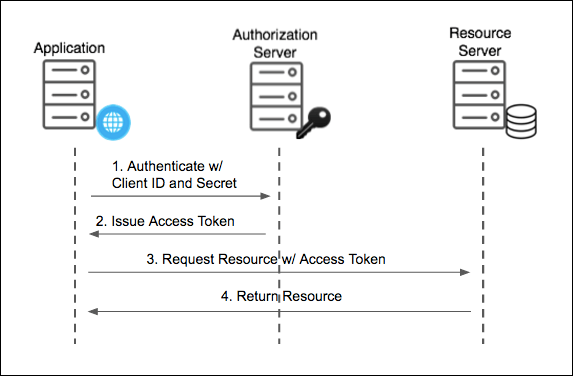
2. Client Credentials — Machine-to-Machine Authorization
Used when there is no human user involved — a backend service authenticating directly as itself to call another service's API. The client sends its client_id and client_secret directly to the token endpoint and receives an access token. No redirect, no user consent screen, no authorization code. Common for: microservice-to-microservice calls, cron jobs, CI/CD pipelines accessing APIs, IoT device backends calling a fleet management API.
The key security consideration: the client_secret must be stored in a secrets manager (AWS Secrets Manager, HashiCorp Vault, GCP Secret Manager) — never in source code or environment variables checked into version control. Rotate it regularly. A leaked client secret in a machine-to-machine flow gives the attacker unrestricted service-level access with no user to notice anomalous behavior.
# Client Credentials — no user redirect needed
POST https://auth.example.com/token
Content-Type: application/x-www-form-urlencoded
Authorization: Basic base64(client_id:client_secret)

grant_type=client_credentials
&scope=internal:orders.read internal:inventory.write

# Response: service-level access token
{
  "access_token": "eyJhbGci...",
  "token_type":  "Bearer",
  "expires_in":  3600
  # No refresh_token — just re-request when expired
}
3. Device Authorization Grant — For Input-Constrained Devices
Designed for devices where typing a URL is impractical — smart TVs, gaming consoles, CLI tools, IoT devices. The device displays a short code and a URL. The user visits the URL on a separate device (phone or laptop), enters the code, and authorizes. The device polls the token endpoint until authorization completes. Defined in RFC 8628.
# Step 1 — device requests a device code
POST https://auth.example.com/device/code
grant_type=urn:ietf:params:oauth:grant-type:device_code
&client_id=my-tv-app
&scope=read:profile

# Response — device displays user_code on screen
{
  "device_code":  "GmRhm...",
  "user_code":    "WDJB-MJHT",  # shown on TV screen
  "verification_uri": "https://example.com/activate",
  "expires_in":   1800,
  "interval":     5             # poll every 5 seconds
}

# Step 2 — device polls until user approves on their phone
POST https://auth.example.com/token
grant_type=urn:ietf:params:oauth:grant-type:device_code
&device_code=GmRhm...
&client_id=my-tv-app
# → returns "authorization_pending" until user approves
# → returns tokens once approved
4. Implicit (Deprecated) and Resource Owner Password (Avoid)
The Implicit grant was designed for single-page apps before PKCE existed: the token is returned directly in the URL fragment (#access_token=...), skipping the code exchange step. This exposes the token to browser history, referrer headers, and any JavaScript running on the page — including third-party scripts from analytics or ads. The OAuth 2.1 draft formally removes it. Do not use for new applications. Replace with Authorization Code + PKCE.
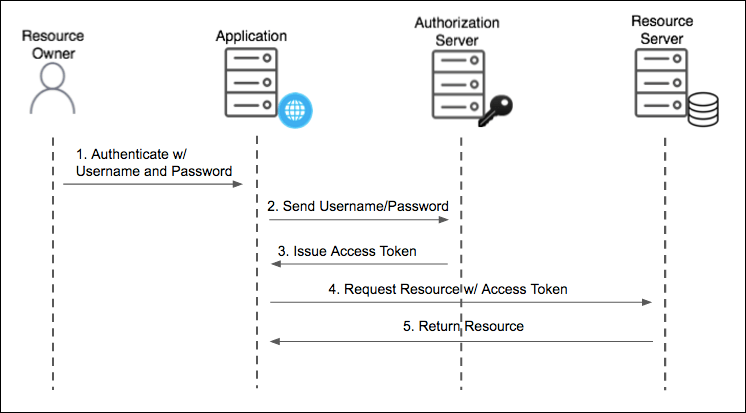
The Resource Owner Password Credentials grant (ROPC) has the client collect the user's username and password directly and forward them to the authorization server. This completely defeats the purpose of OAuth — the user must trust the client with their raw credentials. It is only appropriate for highly trusted first-party clients during a legacy migration away from direct credential handling. The OAuth 2.1 draft removes this grant as well.
Refresh Token — The Long-Lived Credential
Access tokens are intentionally short-lived (typically 15 minutes to 1 hour) to limit the blast radius of token theft. A refresh token is a long-lived credential (days, weeks, or until revoked) that the client can use to obtain a new access token without prompting the user again. This enables seamless user sessions while keeping the attack window for any individual access token narrow.
Refresh token security practices that matter in production:
- Refresh token rotation — on each use, the authorization server issues a new refresh token and invalidates the old one. If a stolen refresh token is used, the legitimate client's next refresh attempt will fail, triggering a re-auth flow. This is the recommended pattern per RFC 6819 and the OAuth 2.1 draft.
- Storage — server-side web apps: store in an HttpOnly, Secure, SameSite=Strict cookie or in the server session (never in localStorage). SPAs: use HttpOnly cookies only — JavaScript cannot read them. Mobile apps: use the platform's secure storage (Keychain on iOS, Keystore on Android).
- Revocation — implement a token revocation endpoint (RFC 7009) so users can log out and tokens are immediately invalidated, even if they haven't expired.
- Absolute expiry — refresh tokens should have a maximum lifetime independent of activity (e.g., 90 days), after which the user must re-authenticate. This limits the risk from refresh tokens stored in old backups.
PKCE — Proof Key for Code Exchange
PKCE (RFC 7636, pronounced "pixie") is an extension to the Authorization Code flow designed for public clients — mobile apps and SPAs that cannot safely store a client secret. Without PKCE, if an attacker intercepts the authorization code in the redirect (via a malicious app registered for the same URI scheme, or a leaked referrer header), they can exchange it for tokens using their own client credentials. PKCE closes this gap cryptographically.
The mechanism: before the authorization request, the client generates a cryptographically random 32–96 byte code_verifier, then computes code_challenge = BASE64URL(SHA256(code_verifier)). The challenge is included in the authorization request. When the client later exchanges the code for tokens, it sends the original code_verifier. The authorization server recomputes the hash and verifies it matches — proving that whoever is exchanging the code is the same party that initiated the request, without a static client secret.
// PKCE implementation in a SPA (Web Crypto API)
async function generatePKCE() {
  const verifier = generateRandomString(64);  // 64 random bytes, base64url encoded
  const encoder = new TextEncoder();
  const data = encoder.encode(verifier);
  const digest = await crypto.subtle.digest('SHA-256', data);
  const challenge = base64urlEncode(digest);
  return { verifier, challenge };
}

// Step 1 — include code_challenge in authorization request
const { verifier, challenge } = await generatePKCE();
sessionStorage.setItem('pkce_verifier', verifier);  // store for later

const authUrl = `https://auth.example.com/authorize
  ?response_type=code
  &client_id=my-spa
  &code_challenge=${challenge}
  &code_challenge_method=S256
  &redirect_uri=https://myapp.com/callback
  &scope=read:profile
  &state=xK9mN2pQ`;

// Step 2 — exchange code, sending verifier (not a secret)
const tokenResponse = await fetch('https://auth.example.com/token', {
  method: 'POST',
  body: new URLSearchParams({
    grant_type: 'authorization_code',
    code: authCode,
    code_verifier: sessionStorage.getItem('pkce_verifier'),  // verifier, not challenge
    redirect_uri: 'https://myapp.com/callback',
    client_id: 'my-spa'
    // no client_secret — public client
  })
});RFC 7636 originally targeted public clients, but the OAuth 2.1 draft mandates PKCE for all Authorization Code flows — including server-side confidential clients. The reason: PKCE defends against authorization code injection attacks even when a client secret exists. Adding PKCE to a confidential client adds no downside and closes an attack class for free.
JWT Access Tokens — Structure and Validation
Access tokens come in two flavors: opaque strings (random identifiers the resource server must look up at the authorization server via introspection) and JWTs (self-contained tokens the resource server can validate locally). JWTs are far more common in modern systems because they eliminate the introspection round-trip — every API call saves a network hop.
A JWT has three parts separated by dots: header.payload.signature, each base64url-encoded. The header identifies the algorithm; the payload carries claims; the signature is a cryptographic proof of integrity.
// JWT header — identifies signing algorithm
{
  "alg": "RS256",   // RSA-SHA256 asymmetric — authorization server signs,
  "typ": "JWT",    // resource servers verify with public key (no secret sharing)
  "kid": "key-v2"  // key ID — enables key rotation without service downtime
}

// JWT payload — registered claims + custom
{
  "iss": "https://auth.example.com",  // issuer — must match expected value
  "sub": "user-42",                  // subject — user or service identity
  "aud": "https://api.example.com",   // audience — intended recipient
  "exp": 1716553600,                  // expiry — UNIX timestamp, reject if past
  "iat": 1716550000,                  // issued at
  "jti": "a1b2c3d4",                  // JWT ID — for revocation and replay detection
  "scope": "read:orders write:cart",   // granted scopes
  "roles": ["customer"]               // custom claim — app-specific authorization
}
Resource server validation steps that must all pass before serving data:
- Verify the signature against the authorization server's public key (fetched from the JWKS endpoint at
/.well-known/jwks.json). - Check
expis in the future (with a small clock-skew tolerance, e.g. 30 seconds). - Check
issmatches the expected authorization server URL. - Check
audcontains this resource server's identifier — prevents token reuse across services. - Check
scopecontains the permission required by the specific endpoint being called. - Optionally check
jtiagainst a short-lived revocation list for sensitive operations.
Never accept the alg field in the JWT header as authoritative — validate it against an allowlist on the server. The classic attack: an attacker changes alg from RS256 to HS256, then signs the token with the authorization server's public key as the HMAC secret (which is often available). A naive library that trusts the header's alg will verify successfully. Always pin the expected algorithm server-side.
Scopes — Fine-Grained Authorization
Scopes are space-separated strings that define the permissions a client is requesting. The authorization server includes them in the token; the resource server enforces them. Good scope design follows the principle of least privilege — a client should request only what it needs for the current operation, not a blanket "admin" scope.
# Requesting specific scopes — follows resource:action naming convention
scope=orders:read orders:write profile:read

# Resource server middleware: check scope before serving
# (pseudo-code — works in Express, FastAPI, Spring Security, etc.)
function requireScope(scope) {
  return (req, res, next) => {
    const tokenScopes = req.auth.scope.split(' ');
    if (!tokenScopes.includes(scope)) {
      return res.status(403).json({ error: 'insufficient_scope' });
    }
    next();
  };
}

# Apply per route
app.get('/orders', requireScope('orders:read'), ordersController);
app.post('/orders', requireScope('orders:write'), ordersController);
The state Parameter and CSRF Protection
The state parameter is not optional — it is the primary CSRF defense in the Authorization Code flow. Without it, an attacker can craft an authorization URL, complete the auth flow themselves, and then trick the victim into hitting the callback endpoint with the attacker's authorization code. The victim's session then becomes associated with the attacker's account (a login CSRF attack). The fix: generate a cryptographically random nonce, store it in the server-side session or a signed cookie, include it as state in the authorization request, and verify it strictly matches on callback before proceeding.
Common Security Pitfalls and Token Theft Prevention
Open Redirect in redirect_uri
If the authorization server does not validate redirect_uri strictly against a pre-registered allowlist, an attacker can craft a URL with redirect_uri=https://attacker.com/steal. The authorization code is redirected to the attacker's server. Mitigation: register exact redirect URIs (no wildcards) and validate them as exact string matches — not prefix matches — on the authorization server.
Access Token Storage in SPAs
Storing access tokens in localStorage or sessionStorage exposes them to XSS attacks — any injected script can read and exfiltrate them. The recommended pattern: keep tokens in memory only (a JavaScript variable or React state), and store the refresh token in an HttpOnly, Secure, SameSite=Strict cookie. An HttpOnly cookie cannot be read by JavaScript, so XSS cannot steal it. The token is sent automatically on same-origin requests. Pair this with a token refresh endpoint that is only callable from the same origin.
Token Leakage via Referrer Headers
If an access token appears in a URL (as it does in the deprecated Implicit flow, or if someone accidentally embeds it in a query string), the browser's Referrer header will expose it to any external resource the page loads — analytics scripts, CDN assets, embedded content. Never put tokens in URLs. Carry them only in HTTP headers: Authorization: Bearer <token>.
Refresh Token Theft and Detection
If a refresh token is stolen, the attacker can silently maintain access indefinitely. Refresh token rotation provides detection: when the attacker uses the stolen refresh token, the authorization server issues a new one and invalidates the old. When the legitimate client next tries to refresh with the now-invalidated token, the server detects the reuse — an anomaly that indicates theft — and can invalidate the entire refresh token family, forcing re-authentication. This is the "refresh token family" detection pattern implemented by Auth0, Okta, and most modern IdPs.
| Attack Vector | Mitigation |
|---|---|
| CSRF on callback endpoint | Validate state parameter (cryptographic nonce) on every callback |
| Authorization code interception | PKCE (all flows, even confidential clients per OAuth 2.1) |
| Open redirect | Exact URI matching against pre-registered allowlist on auth server |
| XSS token theft (SPA) | Store access token in memory only; refresh token in HttpOnly cookie |
| Refresh token theft | Rotation + family invalidation on reuse detection |
| Replay attack | Short access token TTL; jti claim + revocation list for sensitive ops |
| Algorithm confusion | Server-side algorithm allowlist; never trust JWT header's alg |
| Audience confusion | Validate aud claim on every resource server; tokens from one service must not work on another |
Use Cases in Practice
- Third-party app integration — "Connect your Google Calendar" — the app gets read access to calendar data without ever seeing your Google password. The user can revoke access at any time from Google's account settings without changing their password.
- Single Sign-On (SSO) — authenticate once with an identity provider (Okta, Auth0, Google Workspace) and access multiple internal applications. The IdP issues short-lived access tokens and ID tokens; each application validates them locally without calling back to the IdP on every request.
- API authorization for third-party developers — issue scoped tokens to API consumers. A read-only integration partner gets
scope=read:products; a logistics partner getsscope=read:orders write:shipments. A leaked partner token compromises only their scope, not the entire API. - Microservice-to-microservice — the Order Service uses Client Credentials to obtain a token scoped to
internal:inventory.readbefore calling the Inventory Service. Each service validates the token'saudandscopeclaims, so a compromised Order Service cannot call the Payment Service. - CLI tools and developer workflows — the Device Authorization grant allows a CLI tool (
kubectl,gh, Terraform Cloud) to get a user to authorize via their browser while the CLI polls for the token. No password is ever entered in the terminal.
Use Authorization Code + PKCE for all user-facing flows — web and mobile alike, per OAuth 2.1. Use Client Credentials for service-to-service. Use Device Authorization for input-constrained clients. Never use Implicit or Password grant for new systems. Keep access tokens short-lived and in-memory, store refresh tokens in HttpOnly cookies or platform secure storage, rotate them on every use, and validate the state parameter to prevent CSRF. Remember: OAuth 2.0 is authorization — layer OpenID Connect on top for identity. Validate the JWT's signature, expiry, issuer, and audience on every resource server request.
OAuth vs OpenID Connect — what's the difference? OAuth 2.0 is authorization (can this app access your calendar?). OIDC adds authentication on top — it issues an ID token (JWT) with identity claims like name and email. "Login with Google" uses OIDC over OAuth. The ID token answers "who is this?"; the access token answers "what can this client do?"
Why is the Implicit grant deprecated? Tokens are returned in the URL fragment, exposing them to browser history, referrer headers, and any JavaScript on the page including third-party scripts. Authorization Code + PKCE achieves the same goal for SPAs without this exposure — PKCE replaces the need for a client secret in public clients.
What does PKCE protect against? Authorization code interception attacks. The code_challenge proves the token exchange came from the same party that initiated the auth request, even without a client secret. OAuth 2.1 mandates it for all Authorization Code flows.
Where should SPAs store tokens? Access token in memory only (not localStorage — XSS can read it). Refresh token in an HttpOnly, Secure, SameSite=Strict cookie (JavaScript cannot read it, so XSS cannot steal it). Serve the refresh endpoint only from the same origin.
How do you validate a JWT access token? Verify the RS256 signature against the auth server's public key from the JWKS endpoint, then check exp (not expired), iss (expected issuer), aud (this service's identifier), and scope (required permission for this endpoint). Never trust the header's alg field — pin it server-side.