Kubernetes is an open-source container orchestration platform that automates the deployment, scaling, and management of containerized applications. As the industry shifted from monolithic services toward microservices, the need emerged for an orchestrator that could run independent, lightweight application containers with high availability, scalability, and robustness — that is exactly what Kubernetes delivers.
- Pod — the smallest deployable unit; wraps one or more containers and gets a shared virtual IP inside the cluster.
- Service — gives Pods a stable IP/DNS name that survives Pod restarts; doubles as an internal load balancer.
- Control plane — API Server (single gateway), Scheduler (places Pods), Controller Manager (reconciliation loops), etcd (source of truth).
- Deployment vs StatefulSet — Deployments for stateless apps; StatefulSets for databases that need stable ordered identities.
- Secrets are base64, not encrypted — pair with HashiCorp Vault or a KMS for real secret management.
- Helm — the Kubernetes package manager; bundles YAML manifests into versioned, parameterized Charts.
Kubernetes organizes containers into Pods, assigns them stable network identities via Services, and coordinates everything through a master node running the API Server, Scheduler, Controller Manager, and etcd. Worker nodes run Kubelet and Kube Proxy to host the actual workloads.
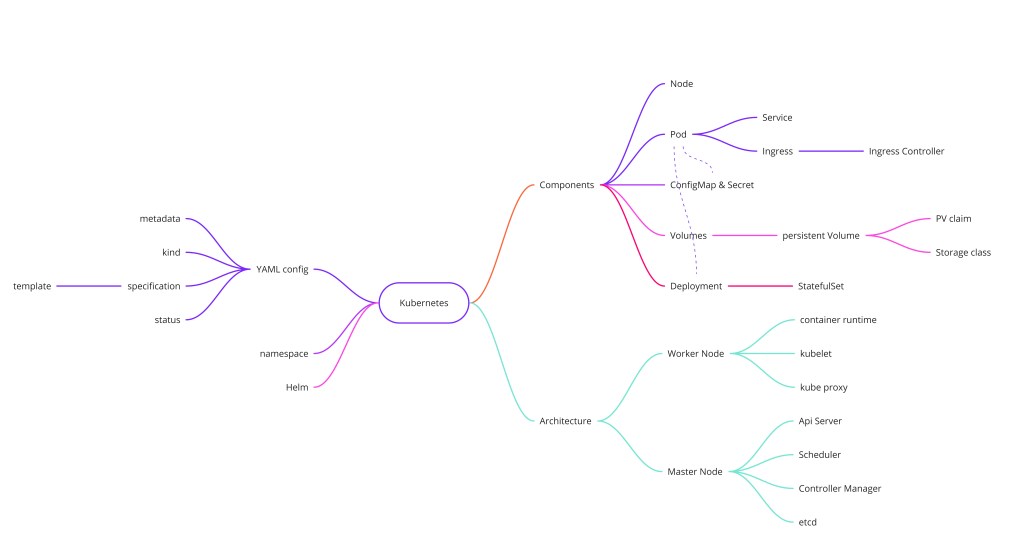
Core Primitives
Pod
The fundamental unit in Kubernetes. A Pod is an abstraction layer over one or more containers, making Kubernetes independent of the underlying container runtime (Docker, containerd, CRI-O). Each Pod receives a virtual IP address for intra-cluster communication, but this IP changes whenever the Pod is replaced — which is why Pods need a stable addressing mechanism on top.
Service
A Service provides a static IP address that persists independently of Pod lifecycles. When a Pod dies and a new one starts, the Service's IP stays fixed and continues routing traffic to healthy Pods. Services also act as an internal load balancer, distributing requests across multiple replicas of the same application.
Ingress
Ingress sits at the cluster boundary and behaves like a reverse proxy. It translates an external domain name (e.g. api.example.com) into the correct internal Service IP and port based on routing rules, so you expose one entry point rather than a NodePort per service.
ConfigMap & Secret
ConfigMap externalizes application configuration (environment variables, config files) so you can update settings without rebuilding the container image. Secret mirrors ConfigMap but stores sensitive data — credentials, API keys, TLS certificates — encoded in base64. Neither should be used as a secure vault; for production secrets management, pair them with tools like HashiCorp Vault.
Volumes
Container filesystems are ephemeral — data disappears when a Pod restarts. Volumes attach persistent storage (local disk or remote block/object storage) to a Pod, ensuring stateful workloads like databases survive Pod replacements.
Deployment vs. StatefulSet
| Aspect | Deployment | StatefulSet |
|---|---|---|
| Use case | Stateless apps (web servers, APIs) | Stateful apps (databases, message brokers) |
| Pod identity | Interchangeable — any replica can handle any request | Stable, ordered identity (pod-0, pod-1 …) |
| Data sync | Not managed | Ordered rollouts ensure leader/follower sync |
| Common pattern | Most microservices | Many teams prefer external DBs over StatefulSet |
Architecture: Master & Worker Nodes
Worker Node Components
- Container Runtime — The engine that actually runs containers: Docker, containerd, CRI-O, or Windows Containers.
- Kubelet — The node agent. It reads Pod specs (YAML), schedules containers onto the node, and reports node/Pod health back to the master.
- Kube Proxy — Implements the Service abstraction at the network layer. It intelligently forwards Service requests to healthy Pods, preferring same-node replicas to reduce latency.
Master Node Components
- API Server — The single cluster gateway. All communication (kubectl, internal components, CI/CD pipelines) goes through the API Server, which handles authentication and request validation.
- Scheduler — Watches for newly created Pods with no assigned node, then selects the best worker based on available CPU and RAM.
- Controller Manager — Runs reconciliation loops. When it detects that the desired state (e.g., 3 replicas) diverges from actual state (2 healthy pods), it triggers corrective actions like rescheduling.
- etcd — The cluster's distributed key-value store — the "brain" of Kubernetes. All cluster state (nodes, pods, configs, secrets) lives in etcd. Losing etcd without a backup means losing the entire cluster state.
Configuration (YAML)
Every Kubernetes resource is declared as YAML. The four mandatory top-level keys are apiVersion, kind, metadata, and spec. The cluster continuously reconciles actual state with the declared spec, and writes the current state back into the status field automatically.
apiVersion: apps/v1
kind: Deployment
metadata:
  name: my-app
  labels:
    app: my-app
spec:
  replicas: 3
  selector:
    matchLabels:
      app: my-app
  template:
    metadata:
      labels:
        app: my-app
    spec:
      containers:
        - name: my-app
          image: my-app:1.0.0
          ports:
            - containerPort: 8080
Namespaces
Namespaces provide logical isolation within a single physical cluster, letting teams share infrastructure while keeping resources separated by function, team, or environment. Kubernetes ships with four built-in namespaces:
- default — where user resources land when no namespace is specified.
- kube-system — system processes (API server, scheduler, etcd).
- kube-public — publicly readable data, accessible without authentication.
- kube-node-lease — node heartbeat objects used for availability tracking.
Important scoping rules: ConfigMaps and Secrets are namespace-scoped — each namespace needs its own copy. Services can be referenced across namespaces using the FQDN service.namespace.svc.cluster.local. Volumes and Nodes are global resources not bound to any namespace.
Helm
Helm is the package manager for Kubernetes. It bundles all the YAML manifests for an application into a distributable unit called a Chart. Helm also acts as a templating engine — you parameterize values (image tag, replica count, resource limits) in a values.yaml file, making it straightforward to deploy the same chart to dev, staging, and production with different settings.
# install a chart from a public repo
helm repo add bitnami https://charts.bitnami.com/bitnami
helm install my-redis bitnami/redis \
  --set auth.password=secret \
  --set replica.replicaCount=2

# list running releases
helm list

# roll back to previous release
helm rollback my-redis 1
Workload Controllers: DaemonSet and Jobs
DaemonSet
A DaemonSet ensures that exactly one copy of a Pod runs on every node (or every node matching a selector). It is the right tool for infrastructure-level agents that must be node-local: log collectors (Fluentd, Fluent Bit), metrics exporters (node-exporter), network plugins (CNI agents), and security scanners. As nodes join the cluster, the DaemonSet controller automatically places a Pod on each new node. As nodes leave, their Pod is garbage collected.
apiVersion: apps/v1
kind: DaemonSet
metadata:
  name: fluent-bit
  namespace: logging
spec:
  selector:
    matchLabels:
      app: fluent-bit
  template:
    metadata:
      labels:
        app: fluent-bit
    spec:
      tolerations:                      # tolerate master-node taint so it runs everywhere
        - key: node-role.kubernetes.io/control-plane
          effect: NoSchedule
      containers:
        - name: fluent-bit
          image: fluent/fluent-bit:2.1
          volumeMounts:
            - name: varlog
              mountPath: /var/log
      volumes:
        - name: varlog
          hostPath:
            path: /var/log
Deployment vs. StatefulSet vs. DaemonSet — Decision Matrix
| Aspect | Deployment | StatefulSet | DaemonSet |
|---|---|---|---|
| Pod identity | Interchangeable — random suffix | Stable: pod-0, pod-1, pod-2 | One per node, node-named |
| Storage | Shared or none | Per-Pod PVC, retained on delete | HostPath typical |
| Rollout order | Concurrent (maxSurge / maxUnavailable) | Ordered: pod-0 → pod-1 → … | Node-by-node rolling update |
| Scale down | Random Pod removed | Highest ordinal removed first | Pod per node, not manually scaled |
| Use cases | Web servers, APIs, workers | Databases, Kafka, ZooKeeper, Elasticsearch | Log agents, node exporters, CNI plugins |
Scheduling and Node Affinity
The Kubernetes Scheduler does more than just "find a node with enough CPU and RAM." It applies a sophisticated two-phase algorithm: filtering eliminates nodes that cannot satisfy the Pod's requirements, and scoring ranks the remaining nodes by preference. Understanding this lets you control exactly where workloads land.
Node Selectors and Node Affinity
nodeSelector is the simplest form: a map of key-value pairs that must match a node's labels. Node Affinity is more powerful — it supports requiredDuringSchedulingIgnoredDuringExecution (hard constraint) and preferredDuringSchedulingIgnoredDuringExecution (soft preference with a weight).
spec:
  affinity:
    nodeAffinity:
      requiredDuringSchedulingIgnoredDuringExecution:   # hard: only GPU nodes
        nodeSelectorTerms:
          - matchExpressions:
            - key: accelerator
              operator: In
              values: [nvidia-a100]
    podAntiAffinity:
      preferredDuringSchedulingIgnoredDuringExecution:  # soft: spread replicas across zones
        - weight: 100
          podAffinityTerm:
            labelSelector:
              matchLabels:
                app: my-app
            topologyKey: topology.kubernetes.io/zone
Taints and Tolerations
Taints work in the opposite direction: they repel Pods from nodes unless a Pod explicitly tolerates the taint. Common uses include dedicating nodes to specific workloads (GPU nodes that only accept ML jobs), excluding Pods from control-plane nodes, or gracefully draining nodes for maintenance (kubectl drain adds a NoSchedule taint automatically).
# Taint a node so only GPU-tolerating Pods land on it
kubectl taint nodes gpu-node-1 accelerator=gpu:NoSchedule

# Pod must declare this toleration to be scheduled on gpu-node-1
# tolerations:
#   - key: "accelerator"
#     operator: "Equal"
#     value: "gpu"
#     effect: "NoSchedule"
Networking: CNI, Services, and Ingress in Depth
Kubernetes networking follows four fundamental rules: every Pod gets a unique IP, every Pod can communicate with every other Pod without NAT, every node can communicate with every Pod, and Pods see the same IP that external agents use to address them. Enforcing these rules is the job of the Container Network Interface plugin.
CNI Plugins
The Container Network Interface (CNI) is a specification that Kubernetes calls when a Pod is created or deleted to configure network interfaces. Popular implementations differ significantly in their networking model:
- Flannel — simplest; uses a flat overlay network (VXLAN or host-gw). No network policy support. Good for development clusters.
- Calico — BGP-based routing (no overlay in L3 mode) for high performance; full NetworkPolicy support and optional WireGuard encryption between nodes.
- Cilium — eBPF-based; bypasses iptables entirely, supporting high-throughput service routing and deep application-layer network policies (L7 policy, Kafka-aware, HTTP-aware). The preferred choice for high-scale production clusters.
- Weave Net — mesh overlay; supports network encryption but higher CPU overhead than Calico or Cilium.
Service Types
| Type | Behavior | Use case |
|---|---|---|
| ClusterIP | Virtual IP reachable only inside the cluster; default type | Internal microservice-to-microservice communication |
| NodePort | Exposes the Service on a port (30000–32767) on every node's external IP | Dev/test external access; not for production |
| LoadBalancer | Provisions a cloud load balancer (AWS ELB, GCP LB) with an external IP pointing at the Service | Exposing a single Service to the internet in cloud environments |
| ExternalName | Returns a CNAME DNS alias to an external hostname; no proxying | Pointing cluster services at external DBs or SaaS APIs |
| Headless (ClusterIP: None) | No virtual IP; DNS returns Pod IPs directly | StatefulSets, service discovery by the application itself (Kafka, Cassandra) |
Ingress and Ingress Controllers
An Ingress resource defines routing rules (hostname, path prefix → Service), but it does nothing without an Ingress Controller — a running Pod that watches Ingress objects and reconfigures itself accordingly. Common controllers include Nginx Ingress Controller, Traefik, HAProxy, and the cloud-native AWS ALB Ingress Controller. You can run multiple controllers in one cluster by annotating Ingresses with ingressClassName.
apiVersion: networking.k8s.io/v1
kind: Ingress
metadata:
  name: api-ingress
  annotations:
    nginx.ingress.kubernetes.io/rewrite-target: /
    cert-manager.io/cluster-issuer: letsencrypt-prod   # auto TLS via cert-manager
spec:
  ingressClassName: nginx
  tls:
    - hosts: [api.example.com]
      secretName: api-tls-cert
  rules:
    - host: api.example.com
      http:
        paths:
          - path: /v1/orders
            pathType: Prefix
            backend:
              service:
                name: order-service
                port:
                  number: 8080
          - path: /v1/products
            pathType: Prefix
            backend:
              service:
                name: product-service
                port:
                  number: 8080
Storage: PV, PVC, and StorageClass
Kubernetes abstracts storage through a three-layer hierarchy: PersistentVolume (PV) represents actual storage capacity in the cluster (provisioned by an admin or dynamically by a StorageClass); PersistentVolumeClaim (PVC) is a user's request for storage with specific size and access mode requirements; and StorageClass defines the provisioner and parameters for dynamic PV creation.
--- StorageClass: defines how PVs are dynamically provisioned
apiVersion: storage.k8s.io/v1
kind: StorageClass
metadata:
  name: fast-ssd
provisioner: ebs.csi.aws.com
parameters:
  type: gp3
  iops: "3000"
  throughput: "125"
reclaimPolicy: Retain          # don't delete EBS volume when PVC is deleted
volumeBindingMode: WaitForFirstConsumer  # provision in same AZ as the Pod

--- PVC: user requests 50 GiB from the fast-ssd StorageClass
apiVersion: v1
kind: PersistentVolumeClaim
metadata:
  name: postgres-data
spec:
  accessModes: [ReadWriteOnce]    # only one node can mount read-write
  storageClassName: fast-ssd
  resources:
    requests:
      storage: 50Gi
Access Modes
- ReadWriteOnce (RWO) — mounted read-write by a single node; the standard mode for databases. Note: multiple Pods on the same node can all mount an RWO volume.
- ReadOnlyMany (ROX) — mounted read-only by many nodes simultaneously; useful for shared configuration or model weights.
- ReadWriteMany (RWX) — mounted read-write by many nodes; requires a distributed filesystem (NFS, CephFS, AWS EFS). Rare and slower than block storage.
- ReadWriteOncePod (RWOP) — Kubernetes 1.22+; only one Pod cluster-wide can mount the volume read-write. Stronger than RWO for StatefulSets.
StatefulSets use volumeClaimTemplates to automatically create one PVC per Pod (e.g., postgres-data-postgres-0, postgres-data-postgres-1). These PVCs are not deleted when the StatefulSet is scaled down or deleted — a deliberate safety net so you don't accidentally wipe your database. Delete them explicitly when you truly want the data gone.
Probes and Self-Healing
Kubernetes makes three kinds of health probes available for every container. Configuring them correctly is the difference between a self-healing cluster and one where failed Pods silently take traffic until an on-call engineer notices.
Liveness Probe
Determines whether the container is alive. A failing liveness probe causes kubelet to kill and restart the container. Use it to detect deadlocks and unrecoverable hangs — situations where the process is running but not actually doing work. Be careful not to set the initial threshold too low: a liveness probe that fires during startup kills the Pod before it's ready, causing a restart loop.
Readiness Probe
Determines whether the container is ready to serve traffic. A failing readiness probe removes the Pod from the Service's endpoints — traffic stops being routed to it — but the container is not restarted. This is the right probe for slow-starting applications, warmup periods, or temporary overload: the Pod stays alive but is taken out of rotation until it signals readiness again.
Startup Probe
Runs during container startup and disables liveness and readiness probes until it succeeds. Essential for applications with long startup times (e.g., JVM services, databases loading large datasets). Once the startup probe succeeds, liveness and readiness probes take over. Without it, a liveness probe might kill a legitimately-starting container.
containers:
  - name: order-service
    image: order-service:2.3.1
    startupProbe:               # allow up to 60s to start
      httpGet:
        path: /actuator/health
        port: 8080
      failureThreshold: 12      # 12 * 5s = 60s max startup time
      periodSeconds: 5
    livenessProbe:
      httpGet:
        path: /actuator/health/liveness
        port: 8080
      initialDelaySeconds: 0    # startup probe already handled the delay
      periodSeconds: 10
      failureThreshold: 3
    readinessProbe:
      httpGet:
        path: /actuator/health/readiness
        port: 8080
      periodSeconds: 5
      failureThreshold: 2
Autoscaling: HPA, VPA, and Cluster Autoscaler
Kubernetes offers three complementary autoscaling mechanisms that operate at different granularities. Understanding when to use each — and how they interact — is a common interview topic.
Horizontal Pod Autoscaler (HPA)
HPA scales the number of Pod replicas up or down based on observed metrics. The default metric is CPU utilization relative to the Pod's resource request, but custom metrics (request rate, queue depth, external metrics from Prometheus) are supported via the custom metrics API. HPA polls the metrics server every 15 seconds and adjusts replicas within the bounds of minReplicas and maxReplicas.
apiVersion: autoscaling/v2
kind: HorizontalPodAutoscaler
metadata:
  name: order-service-hpa
spec:
  scaleTargetRef:
    apiVersion: apps/v1
    kind: Deployment
    name: order-service
  minReplicas: 3
  maxReplicas: 50
  metrics:
    - type: Resource
      resource:
        name: cpu
        target:
          type: Utilization
          averageUtilization: 60   # scale up if CPU > 60% of request
    - type: Pods
      pods:
        metric:
          name: http_requests_per_second
        target:
          type: AverageValue
          averageValue: "1000"    # 1000 RPS per replica
  behavior:
    scaleDown:
      stabilizationWindowSeconds: 300  # wait 5 min before scaling down
Vertical Pod Autoscaler (VPA)
VPA adjusts resource requests and limits (CPU and memory) for individual Pods rather than the replica count. In Auto mode it evicts and restarts Pods with updated requests; in Off mode it only provides recommendations. VPA is useful when you don't know the right resource requests up front, but it conflicts with HPA on CPU/memory — use VPA for requests and HPA on custom metrics, or use VPA in recommendation-only mode alongside HPA.
Cluster Autoscaler
Both HPA and VPA assume there are available nodes to schedule Pods onto. When there aren't, the Cluster Autoscaler (CA) talks to the cloud provider's API (AWS, GCP, Azure) to add or remove nodes from the cluster's node groups. CA adds nodes when Pods are unschedulable due to insufficient resources, and removes underutilized nodes after a configurable cool-down period (default 10 minutes). Importantly, CA respects Pod Disruption Budgets during scale-down: it won't remove a node if doing so would violate your PDB.
The standard production setup: HPA on CPU + custom metrics to adjust replica count; VPA in recommendation mode to right-size your resource requests; Cluster Autoscaler to add/remove nodes as needed. Set resource requests and limits on every container — without requests, the HPA has no baseline to compute utilization against, and the scheduler can't make informed placement decisions.
The Operator Pattern
A Kubernetes Operator is a custom controller that encodes the operational knowledge of a specific application into code. It extends the Kubernetes API with Custom Resource Definitions (CRDs) — new resource types like PostgresCluster, KafkaCluster, or ElasticsearchCluster — and runs a control loop that watches those resources and drives the cluster toward the desired state they declare.
Why Operators Exist
Kubernetes natively handles stateless workloads beautifully: deploy, scale, rollback. But stateful systems — databases, message brokers, search engines — require domain-specific operational logic: initializing a cluster, electing a leader, performing a rolling upgrade that respects quorum, taking consistent backups, restoring from a snapshot. A human operator executing runbooks encodes this knowledge; a Kubernetes Operator automates it.
# Using the CloudNativePG Operator to declare a PostgreSQL cluster
apiVersion: postgresql.cnpg.io/v1
kind: Cluster
metadata:
  name: orders-db
spec:
  instances: 3           # 1 primary + 2 replicas
  primaryUpdateStrategy: unsupervised
  storage:
    size: 100Gi
    storageClass: fast-ssd
  backup:
    barmanObjectStore:
      destinationPath: s3://my-bucket/backups/orders-db
      s3Credentials:
        accessKeyId:
          name: s3-creds
          key: ACCESS_KEY_ID
The CloudNativePG Operator sees this Cluster CR and handles the rest: creating the primary Pod, setting up streaming replication to the replicas, configuring a headless Service for each Pod's stable DNS name, configuring a separate Service for primary writes vs. replica reads, setting up continuous WAL archiving to S3, and performing rolling upgrades that promote a replica before shutting down the primary to minimize downtime. All of that operational complexity — which would require a lengthy runbook — is now encoded as code and triggered by a single YAML declaration.
Popular Operators
- Strimzi — Kafka clusters and topics as CRDs; manages brokers, ZooKeeper, Kafka Connect, and MirrorMaker 2.
- Prometheus Operator —
ServiceMonitor,PodMonitor, andPrometheusRuleCRDs to configure scrape targets and alerting rules declaratively. - cert-manager —
CertificateandClusterIssuerCRDs for automatic TLS certificate provisioning and renewal from Let's Encrypt or private CAs. - Argo CD — GitOps operator that reconciles the cluster state to match a Git repository, making every deployment a git commit.
- KEDA (Kubernetes Event-Driven Autoscaling) — scales Deployments and Jobs based on external event sources: Kafka consumer lag, SQS queue depth, HTTP request rate — bridging the gap between HPA's CPU-centric model and event-driven workloads.
Resource Management: Requests, Limits, and QoS Classes
Every container should declare CPU and memory requests (guaranteed allocation used by the scheduler) and limits (the maximum the container may consume). The relationship between them determines a Pod's QoS class, which controls eviction priority under node memory pressure.
| QoS Class | Condition | Eviction Priority |
|---|---|---|
| Guaranteed | requests == limits for every container in the Pod | Last to be evicted; reserved capacity |
| Burstable | At least one container has requests set, but requests < limits | Evicted after BestEffort; eviction order by memory usage relative to request |
| BestEffort | No requests or limits set at all | First to be evicted under memory pressure |
Set CPU requests = your steady-state usage and CPU limits = 2-4x requests to allow bursting. For memory, set requests = your p99 usage and limits = requests (i.e., Guaranteed class) for latency-sensitive services — a container that exceeds its memory limit is OOMKilled immediately; a pod that exceeds its CPU limit is only throttled (not killed), making memory limits far more consequential.
Think of Kubernetes as a self-healing, declarative control loop: you describe what you want in YAML, and the master node's Controller Manager continuously drives actual state toward it. Pods give you isolation; Services give you stable addressing; etcd gives you durable cluster memory; and Helm gives you reusable, versioned packaging. Layer in HPA + Cluster Autoscaler for elasticity, Operators for stateful applications, and proper probe configuration to make the self-healing loop actually work.
What happens when a Pod crashes? The Controller Manager detects divergence from the desired replica count and instructs the Scheduler to place a new Pod — the Service's IP stays unchanged throughout.
Deployment vs StatefulSet vs DaemonSet? Deployments for stateless apps (interchangeable Pods); StatefulSets for databases (stable ordered Pod identity, per-Pod PVC); DaemonSets for node-local infrastructure agents (one Pod per node).
Why is etcd critical? It is the single source of truth for all cluster state; losing etcd without a backup means losing the entire cluster configuration.
HPA vs VPA vs Cluster Autoscaler? HPA scales replica count; VPA adjusts per-Pod resource requests; Cluster Autoscaler adds/removes nodes. Use all three together: HPA on custom metrics, VPA in recommendation mode, CA to provision capacity.
What is a liveness vs readiness probe? Liveness failure kills and restarts the container; readiness failure removes it from the Service endpoint without restarting — use readiness for warmup and temporary overload.
What is the Operator pattern? A custom controller that encodes operational runbooks as code, using CRDs to extend the Kubernetes API with domain-specific resource types like KafkaCluster or PostgresCluster.